
Why object removal breaks on transparent surfaces
Three common workarounds for removing an object from a transparent image, why each one fails, and what changed when Cleanup started treating the alpha channel as a first-class input.
Most object removal demos use the easy case. A solid object sits on an opaque backdrop, the mask lines up with a hard edge, and the model fills the hole with more backdrop. That looks convincing because there was very little to reconstruct in the first place.
Then someone hands the model a PNG with an alpha channel, and the illusion falls apart.
This is not a rare corner case. Transparent assets are the normal currency of a design pipeline. Cutouts, logos, packshots, and anything that has already been through background removal all arrive as RGBA. If your editing step cannot read the fourth channel, every one of those files is a problem.
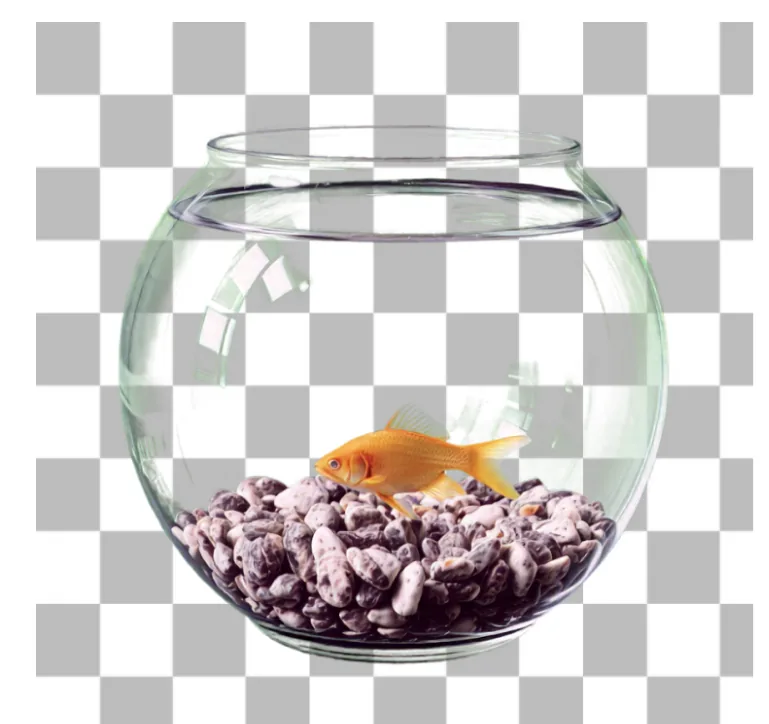
The image below is the test
The bowl is glass. The water is transparent. The background is transparent, which is what the checkerboard represents. And the fish has to go.
Almost nothing about this image is a hard edge. The rim of the bowl is a blend of the glass, whatever is behind the glass, and the refraction between them. The water carries color from the fish. The pixels along the boundary are not object or background, they are some proportion of both, and a mask that calls them one or the other has already thrown away the information that made the photograph look real.
Three workarounds, three different failures
Before Cleanup v3.0, Jasper's own model had the same limitation as most models on the market: it could only process standard RGB. There are three common ways to work around that, and each leaves its own signature.
Process the RGBA file as if it were RGB. The alpha channel is not understood, so the model renders the object region with discolored and distorted output. In the example below, the fish has not been removed at all. It has been turned into a flat green smear, because the model interpreted transparency data as color data.
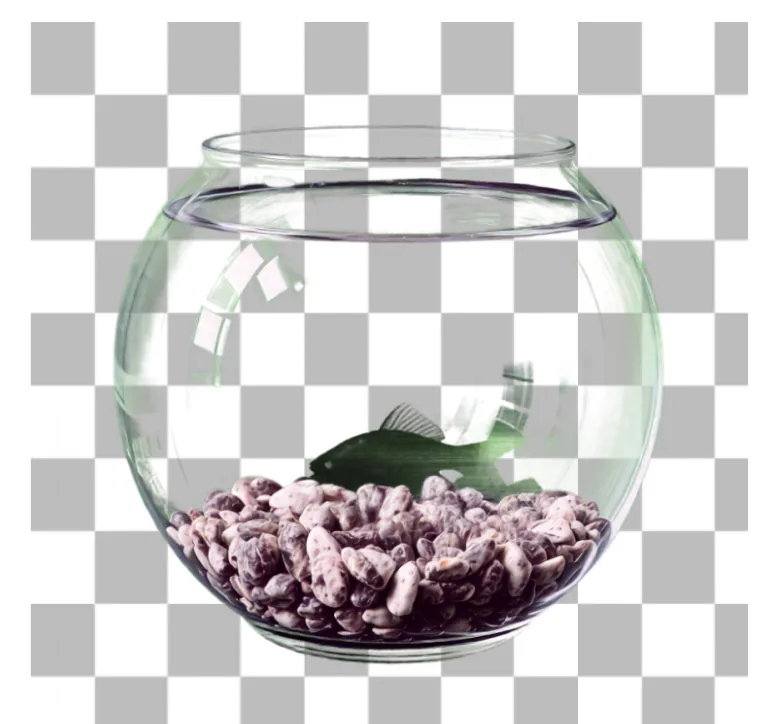
What happens when transparency is read as color. The object is not removed, it is corrupted.
Strip the alpha, inpaint in RGB, then reapply the original mask. This is the better workaround, and it is what most careful implementations do. The fish does get removed. What it cannot do is render complete transparency, because the alpha channel it puts back is the one it started with. Any transparency that should have changed as a result of the edit is simply not represented.
Composite onto white, inpaint, then run background removal to build a fresh alpha. This one sometimes works, which is what makes it dangerous. It degrades object edges, because the new alpha channel is inferred by a second model rather than preserved, and it fails on semi-transparent objects, because a semi-transparent pixel composited onto white is indistinguishable from a lighter opaque pixel. The information needed to undo the composite is gone.
Notice that all three failures come from the same decision. Each treats transparency as something to be removed before the real work starts, and then restored afterwards. The alpha channel is handled beside the model rather than by it.
Treating transparency as a first-class input
Cleanup v3.0 changes where transparency lives. Rather than stripping it at the front of the pipeline and reattaching it at the back, the model carries alpha through the entire process alongside color.
The change that makes this possible is a custom RGBA variational autoencoder, built into an upgraded Latent Bridge Model architecture based on LBM-SDXL. A standard VAE compresses an image into a latent representation that encodes three channels. This one encodes transparency information alongside the color data, so the alpha channel is present in the representation the model actually reasons about rather than being metadata wrapped around it.
The practical consequence is that boundary pixels stay boundary pixels. Edges come back without artifacts, and semi-transparent regions survive the edit as semi-transparent.
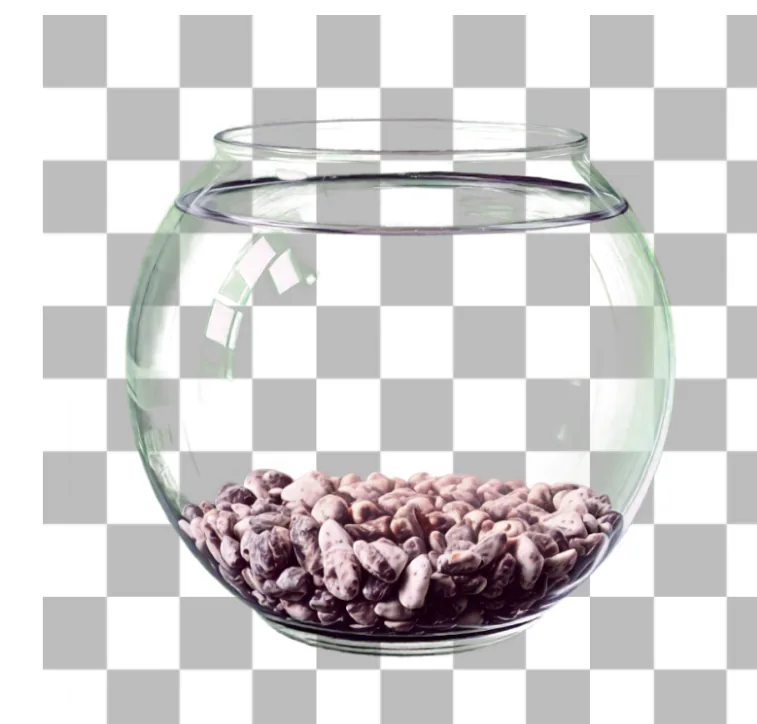
Native RGBA processing. The fish is gone, the glass is still glass, and the transparent background is intact.
What this means for an integration
Two properties matter more than the architecture if you are wiring this into a product.
The first is that there is nothing to wire. The same endpoint accepts both formats and detects the four-channel input on its own, so you do not need routing logic that inspects the file and picks a code path.
The second is that RGB behavior is unchanged. Three-channel images bypass the transparency components entirely, at the same speed and quality as before, so adopting v3.0 does not mean re-validating the cases that already worked. This matters more than it sounds. The usual cost of a model upgrade is not the new capability, it is re-testing everything the old version already did correctly.
What to check when you evaluate any cleanup model
The failure modes above are easy to miss precisely because they only appear under conditions most evaluations avoid. If you are comparing models, the useful test set is not your best photography. It is the assets that already generate manual retouching work.
- Products behind or inside glass, including bottles, jars, and display cases.
- Anything with a soft or fibrous edge, such as textiles, fur, foliage, or hair.
- Objects that are themselves semi-transparent.
- Assets that have already been through background removal, so they arrive as RGBA rather than as a flat photograph.
- Anything that will be composited onto a dark or colored background later.
Then review the output on a checkerboard or a dark background rather than on white. Every failure described in this article is invisible against white, which is exactly why they reach production. A green fish and a clean bowl look identical in a thumbnail on a white page.
Where this sits in a pipeline
Cleanup is rarely the only operation. It usually runs between a segmentation step that produces the mask and a compositing step that places the result somewhere new, and each of those hand-offs is a chance to flatten the asset.
That is the part worth designing deliberately. A single flattening step early in the chain cannot be recovered by a better model later, because the information is not degraded, it is absent. Keep the image in a format that carries alpha for the whole pipeline, and verify the channel survives at each boundary rather than only at the end.